Thread #108605846

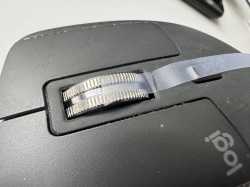
>premium mouse
>cleaning the scroll wheel requires carefully trimming and attaching double-sided tape so you can run it through
What were they THINKING?
79 RepliesView Thread
 Showing all 79 replies.
>>
>>
>>
File: 1776171032175.jpg (99.5 KB)

99.5 KB JPG
>>108605846
>>
>>
>>
>>
File: 1403483641908.jpg (1.2 MB)

1.2 MB JPG
>>108605974
>clogged scroll wheel.
scroll harder nigga.
>>
>>
>>
File: file.png (718.2 KB)
718.2 KB PNG
>>108606176
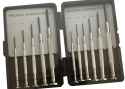
You must be the only human to not currently own one of these. It seems like everyone acquires one at some point in their lives, either through direct purchase or through osmosis.
>>
>>108606193
Option 1
>remove all the adhesive mouse feet, unscrew 6 screws, release the three clips, and disconnect the interconnect cable
Option 2
>run a piece of tape through the mouse wheel
If you're such an intelligent practical fellow tell me which one is more practical
>>
>>
>>
>>
>>
File: graphics tablet.png (212.2 KB)

212.2 KB PNG
>>108605846
>inexpensive
>easy to clean
why aren't these more popular for general computer use
>>
>>
>>
>>108606332
I actually tried one of these, and it was pretty good as a mouse replacement. The only issue is that I’d lose my cursor position every time I’d need to type on the keyboard, which doesn’t happen on a mouse or trackball.
How’s your experience?
>>
>>108606435
i have tried a few methods, i am using opentabletdriver so if you are on either linux or windows the experience should be replicable:
> remapped caps to left click and ctrl+caps to right click
with how small elements are on webpages there was always some accuracy lost when trying to actually touch my pen to the tablet to click things
>absolute positioning mode
>Three monitors
>Alt->F1 = monitor 1
>Alt->F2 = monitor 2
>Alt->F3 = monitor 3
this solves the losing mouse issue, since you just click the bind on your keybind to choose what monitor you want to interact with, and point your mouse to it and your cursor is there
>mouse mode (Alt->F4 bound)
used this pretty much for doing anything across monitors, like dragging windows
most of my time loss comes from the context switch from typing on my keyboard to picking my pen back up and getting it back on the tablet
>>
>>108606478
Oh, I was using the pen buttons for left/right click lmao. I’ll try that out.
But I have a question, if you play any vidya (fps games), how is it? Would you get some kind of accuracy boost? I did find that I had to set my tablet to relative/mouse mode when playing any fps vidya.
>>
>>
>>
>>
>>108606504
i've tried. relative mode is a must unless you are playing some RTS or moba. the problems i faced:
>needing to bind keyboard to shoot
i bound space to shoot in most my games. this is a real big hurdle to overcome mentally and the amount of work your hands have to do to move and shoot at the same time, for example, is a habit that takes a while to build
>sensitivity
you pretty much need to play with two sensitivities you swap between. one for aiming and one for moving. also confusing if you are playing a game where there is a lot of movement and you are expected to make some precise shots
i just stick to mouse for gaymen
>>
>>
>>
>>
I think the real endgame question is actually: should mice be designed to be as closed off as possible to minimize debris intake, like how typical wheels and the surrounding frame is constructed, or should mice be designed with more open frames that are easier to clean without detail disassembly (and turning it upside down will let stuff fall out)?
>>
>>
>>108606332
These are perfect for editing pictures or drawing, but I don't like using them for regular navigation. I have a couple Wacom tablets old & new.
I think most people on this thread should look into index-finger trackballs, which might be biased coming from me because I use one.
>>
>>108606927
Do you have any recommendations for index finger trackballs with low stiction? I used to have a slimblade which I unfortunately broke while trying to mod it with different bearings to remove stiction :(
Also, do you play vidya with it? I’m getting tired of gaming with traditional mice as you can tell lmao
>>
>>
>>
>>
>>
>>
>>
>>108605846
Is there any fucking mouse with smart scrollwheel (the one that activates on its own, so that you don't have to press a button). I know Masters have it. I have Basilisk V3, but rubber on that thing is just aids.
>>
>>
>>
>>
>>
What's even more retarded about this mouse is that:
>it lacks on-board memory
>it requires Logitech's software to configure
>the default version demands you to make an account to do macros like on G HUB
>there is a hidden offline version that just cuts all of that out
>also you cannot use it wired, that's for charging only
I still like it tho, the shape is comfy and the MagWheel is fantastic.
>>
>>
File: 1754524309126956.png (2.2 MB)

2.2 MB PNG
>>108608797
At least the MX Master 3/3S is easy to fix by yourself. After the usual "screws under the gliders" bullshit you get easy access to the internals, and you can resolder the switches once they start failing, because Logitech. iFixIt even offers genuine replacement parts.
Though obviously they likely count on most people being chumps that are incapable of doing basic electronic repair, and are likely deathly afraid to attempt anything involving touching wires and connectors.
>>
>>
>>
>>108608866
Of course, but it's a good sign that Logitech didn't design it to be completely one-use if they humor the idea of you being able to replace the parts that are most prone to failure yourself this much.
>>
>>

>>
File: 1752270104697265.jpg (39.9 KB)

39.9 KB JPG
>>108609646
>Logitech brings back the MX518
>stops making it
>Microsoft brings back the Intellimouse
>stops making it
Fuck both Logitech and Microsoft that they revived two of the best mouse shapes and then quickly killed them so if you haven't bought them when they were available you're SOL
>>
>>
>>
File: 1753652409373019.jpg (33.1 KB)

33.1 KB JPG
are you guys all dumb in that fucking board or something?
just put the mouse upside down and gently tap on the mouse to make the dust fall on the ground, that's it
>>
>>
>>
>>108610159
I've cleaned two mice (Both HyperX, only ones expensive enough for me to feel like it was worth cleaning them instead of throwing them out and buying a new one) and a bigger issue than the glue sticking again is that it's borderline impossible to make them flat after removing them (I was as careful as possible when removing them). Closest I got was grabbing a hard drive platter, sticking them to it, and putting a bowl of boiling water on top. This somewhat worked, but still didn't feel great so I just bought a set of replacements, not a huge expense, but still somewhat annoying. Maybe this issue isn't a thing with ceramic skates, but apparently no one makes them for either the Pulsefire or the Surge
>>
>>
>>108606193
I had 2 or 3 of those kits and they all fucking broke when the screw was in too tight (the tip and the base of the screwdriver stopped making contact, they must be glued together or something), or the screw heads just chafed off. I was really fucking glad when I finally got an exchangeable tip screwdriver kit that I've been using ever since.
In fact your pic gave me PTSD for the amount of time I wasted with those absolute fucking garbage screwdrivers.
>>108606314
>I don't own that specific one, but most mice have the screws under the skates, so you need to buy new ones everytime you clean them
You can put the skates back afterwards. As long as you do it immediately after unscrewing, they won't collect any grime and will still stay stuck.
Failing that, some mice come with replacement pads, and failing even that, replacement pads cost ONE FUCKING DOLLAR on aliexpress.
>>108607010
>For cleaning gunk INSIDE the mouse you retard
Take the mouse apart, scrub it clean, put it back together. I've done this shit dozens of times.
In fact I may need to do it soon because the scroll wheel started going in random directions again, I'm gonna have to solder in another replacement. I have a 10 pack of replacement encoders, enough to make a mouse last from 10 months to 7-8 years (or until something else breaks).
>>
>>108610302
>You can put the skates back afterwards. As long as you do it immediately after unscrewing, they won't collect any grime and will still stay stuck.
Read >>108606314, the issue isn't grime, it's deformation
>replacement pads cost ONE FUCKING DOLLAR on aliexpress.
It's not about the money, it's the inconvenience of having to buy them at all given that it could be as easy as not having the screws under the skates. Imagine needing a screen change everytime you want to switch your phone's sim card
>>
>>108606225
>>108606428
Ok faggots give me a good mouse brand
>>
>>
>>108610728
NTA, but Keychron M6 does 95% of what Masters does, has better materials, connectivity, like eight times better polling rate, and should last longer, too. The only thing that's missing is the smart scrolling (you still have to manually switch it).
And it is cheaper, too.
>>
>>
>>
>>
>>
>>
>>
>>
File: 2.jpg (230.6 KB)

230.6 KB JPG
>>108616695
Forgot my pic.
>>
>>
>>
File: IMG_20170920_130839.jpg (1.7 MB)

1.7 MB JPG
>>108616713
reminder to crack the shell open and harvest your gamer crust
it's in season